 Memmy
MemmyMemmy
Let every AI remember the same you.
Memmy is your personal memory hub and a dedicated Agent that truly knows you — it lets every AI connect to the same memory and evolve together through collaboration.
It distills your knowledge, preferences, and project experience into personal memory, and lets different Agents — Cursor, Claude Code, Codex, OpenClaw, and more — share the same context.
Memmy ships as a desktop app, a CLI, and an API, so you can use the same long-term memory in different ways. Accumulate once, use everywhere.
- Download the Memmy desktop app and finish onboarding in minutes
- BYOK mode — plug in the model quota you already have
- Turn your Cursor, Claude Code, and Codex history into memory
What Is Memmy
Memmy is not just an app with a chat window — it is a complete local Agent Runtime:
- The Desktop app provides the task workbench, desktop pet, memory panel, tool connections, and settings pages.
- The Agent Runtime handles conversations, tool calls, MCP, scheduled tasks, long-running tasks, sessions, and skills.
- The Memory service handles memory writing, retrieval, archiving, and analytics, using local SQLite by default.
- The Local backend handles accounts, configuration, integrations, Agent source scanning, Skill installation, and the local machine API.
- The CLI and HTTP API let external Agents, scripts, or other products plug into Memmy too.
Who It's For
- People who use multiple AI coding/chat tools at once (Cursor, Claude Code, Codex, Opencode, OpenClaw, Hermes) and want them to share one set of memory.
- Developers who want local-first data and bring-your-own API Keys.
- Everyday users who want an always-on-desktop, on-call Agent entry point (the desktop pet).
What You Need
- A macOS or Windows device (desktop app), or a Node.js
>=22environment (CLI / from source). - Account mode: a Memmy account (includes platform trial tokens).
- Or API Key mode: an API Key from any supported model provider.
How It Works
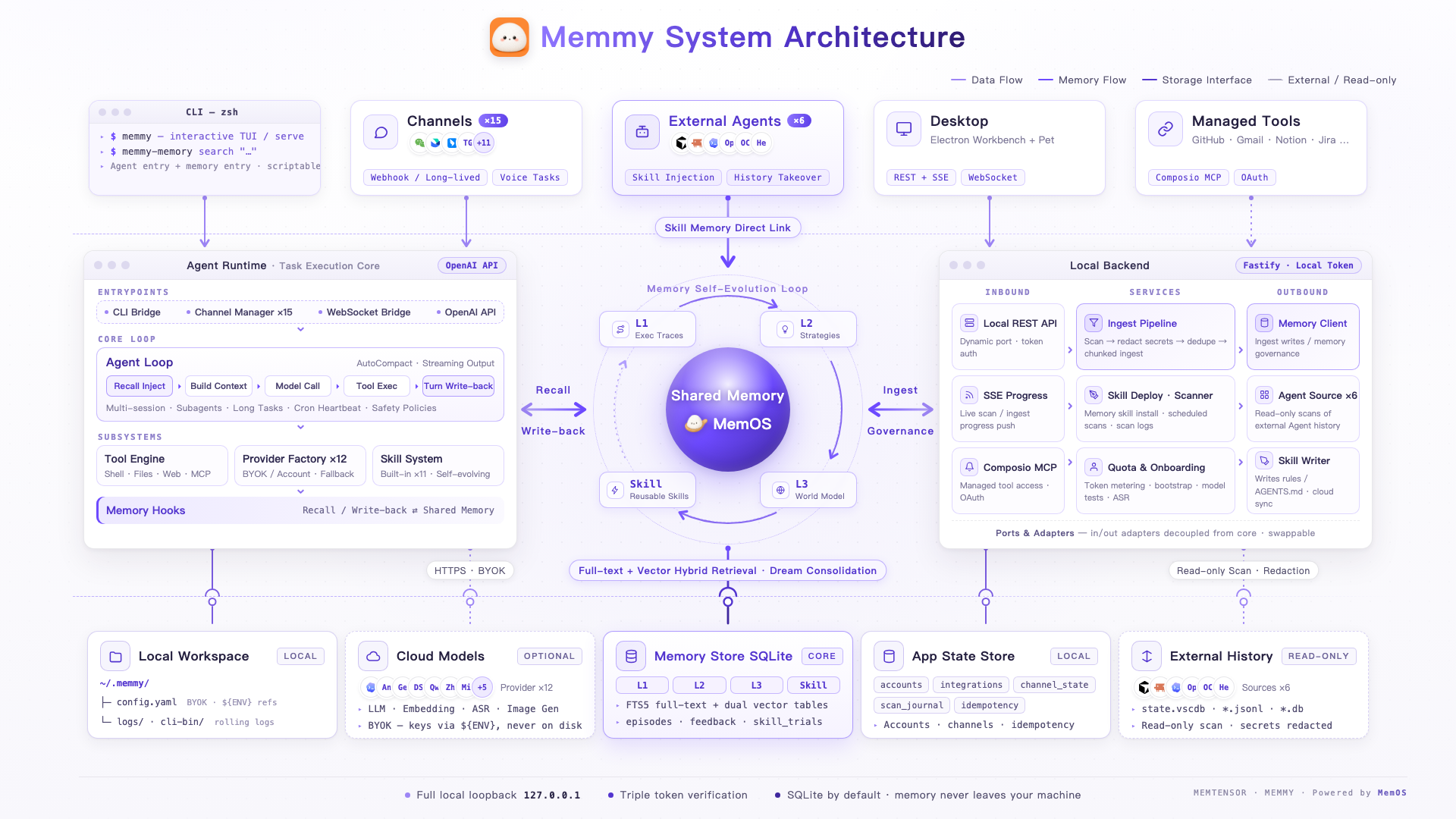
Core Capabilities
- Scan conversation history from Cursor, Claude Code, Codex, and more; dedupe, ingest, and search it in one place.
- Config lives in
~/.memmy/config.yaml, memory in local SQLite, and every endpoint is token-protected. - Multi-session tasks, streaming output, attachments, voice input, and slash commands.
- A transparent always-on-top mini window that takes text or voice tasks anytime and syncs with the main workbench.
- Channels like Telegram, WeChat, Feishu, and DingTalk, plus managed integrations such as GitHub, Notion, and Slack.
- Many providers including OpenAI-compatible, Anthropic, Gemini, DeepSeek, and Ollama.
Quick Start
- Download and launch the Memmy desktop app, or build
App/memmy-agentand use the CLI. - Choose account mode or API Key mode, configure your primary model, and pass a connection test. CLI users run:
memmy onboard- Send your first task from the main workbench, or in the terminal:
memmy agent --message "Hi, introduce the current workspace"Keep your first milestone small: get one normal reply working in the desktop app or CLI first, then move on to tools, channels, MCP, memory scanning, and the desktop pet.
Configuration
The main config defaults to ~/.memmy/config.yaml and supports ${ENV_NAME} environment variable references:
agents:
  defaults:
    model: openai/gpt-4.1
    provider: openai
    timezone: "+08:00"

providers:
  openai:
    apiKey: ${OPENAI_API_KEY}
Next Steps
Full installation and first-run setup · Overview, entries, policies, world model, and logs · Connect Memmy to your IM · memmy and memmy-memory commands · Processes, ports, and data flow · FAQ and troubleshooting entry points